
Your cart is empty.
Browse plugins
Description
Push waitlist signals to the people who can act on them: Slack, Discord, Microsoft Teams or any webhook, with demand threshold alerts, restock summaries, failure warnings and a daily digest.
Waitlist demand is a buying signal, and it is worth nothing if it only exists inside wp-admin. Point this at the channel where your buying or merchandising conversations already happen.
How it works
- Demand thresholds are evaluated every thirty minutes. A product is announced once per multiple of your threshold, so one reaching twenty five announces once and stays quiet until it crosses fifty. Without that it would announce every half hour forever.
- Restock summaries are batched over five minutes rather than sent per subscriber, so a restock of a popular line produces one message instead of flooding the channel.
- Payloads are shaped per destination. Slack blocks, Discord embeds and the Microsoft Teams MessageCard format are all different, so posting the same JSON everywhere and hoping does not work.
Setting it up
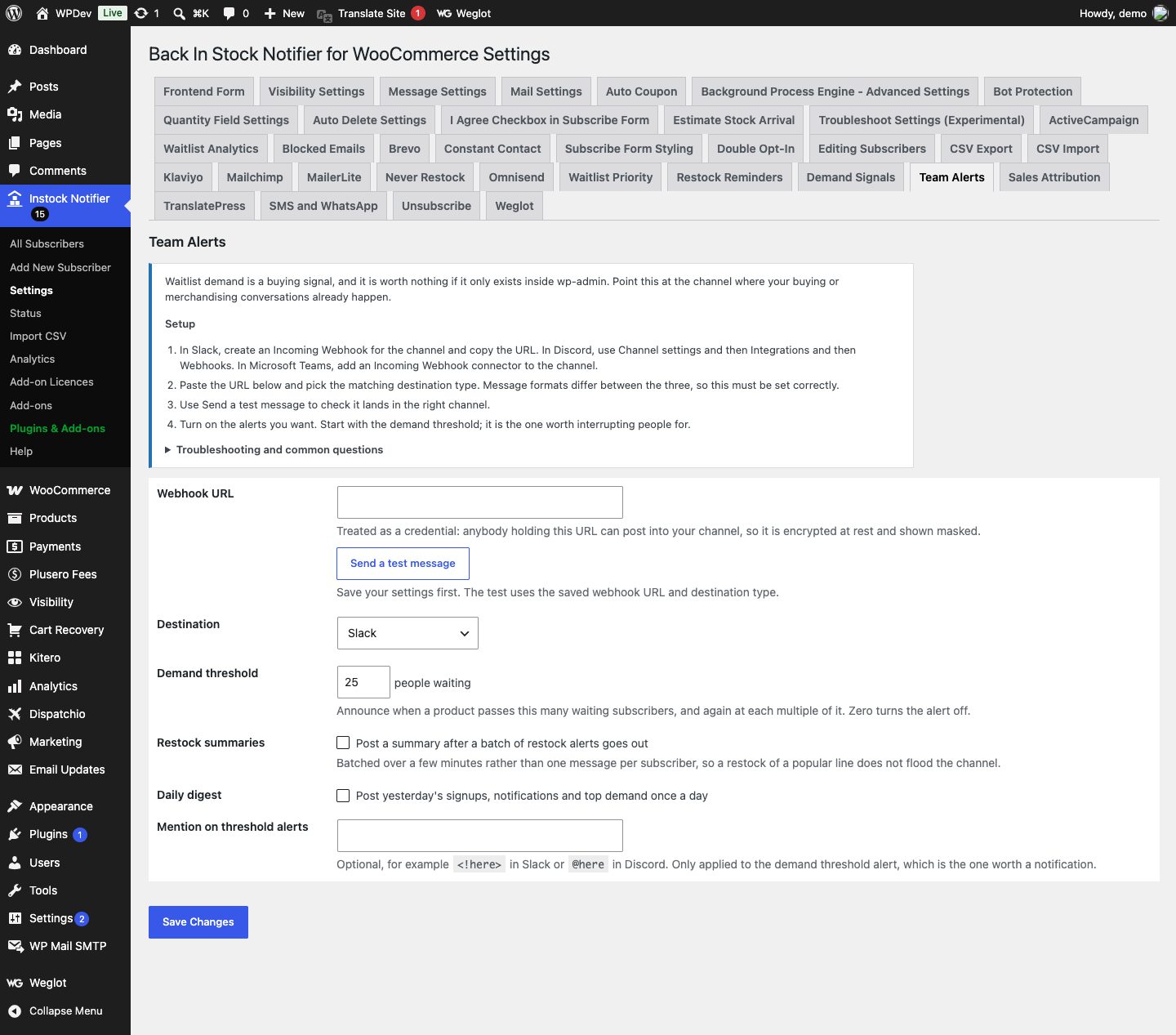
- In Slack, create an Incoming Webhook for the channel and copy the URL. In Discord, use Channel settings and then Integrations and then Webhooks. In Microsoft Teams, add an Incoming Webhook connector to the channel.
- Paste the URL below and pick the matching destination type. Message formats differ between the three, so this must be set correctly.
- Use Send a test message to check it lands in the right channel.
- Turn on the alerts you want. Start with the demand threshold; it is the one worth interrupting people for.
Common questions
Nothing arrives in the channel. Check the destination type matches the URL, and that the webhook has not been revoked. The exact response from the chat platform is recorded in the plugin log.
How often does the threshold alert fire? Once per product per threshold crossed. A product that reaches twenty five announces once, and does not announce again until it crosses fifty. It will not repeat while it hovers around the same number.
Can I send to more than one channel? One webhook per site through this screen. For more, hook ppl_bis_teamalerts_payload and fan out from there.
Is customer data sent to the chat platform? No. Alerts carry product names and counts only. No email addresses or phone numbers ever leave the site through this add-on.
Data and privacy
- Sent to the chat platform: product names, counts and potential values only. No email addresses or phone numbers ever leave the site through this add-on.
- The webhook URL is treated as a credential, because anybody holding it can post into your channel. It is encrypted at rest and shown masked.
- Stored per product: the last demand threshold band announced, so alerts do not repeat.
Additional information
| License | Starter License, Growth License, Ultimate License |
|---|
Related products
Back In stock Notifier for WooCommerce: Add-ons
Demand Signals Add-on - Back In Stock Notifier for WooCommerce
From
$19.00
One-time

Back In stock Notifier for WooCommerce: Add-ons
Bundle Add-ons - Back In Stock Notifier for WooCommerce
All 26 Back In Stock Notifier add-ons in one plugin, switched on and off individually, for…
From
$49.00
One-time
Back In stock Notifier for WooCommerce: Add-ons
MailerLite Add-on - Back In Stock Notifier for WooCommerce
From
$19.00
One-time