
Your cart is empty.
Browse plugins
Description
WooCommerce Role Based Payment Gateways / Shipping Methods gives site administrators complete control over what each customer sees at checkout. Show or hide any payment gateway and any shipping method per WordPress user role, including logged-out guests, and refine each rule further with cart, destination, customer and schedule conditions.
Version 4.0 is a full rebuild: a new condition engine, a redesigned settings screen, a built-in rule tester, import/export, WP-CLI support and a hardened, audited codebase.
What’s new in 4.0
- Condition engine – narrow any role rule by cart total, cart contents, destination, specific customers, coupons or a schedule.
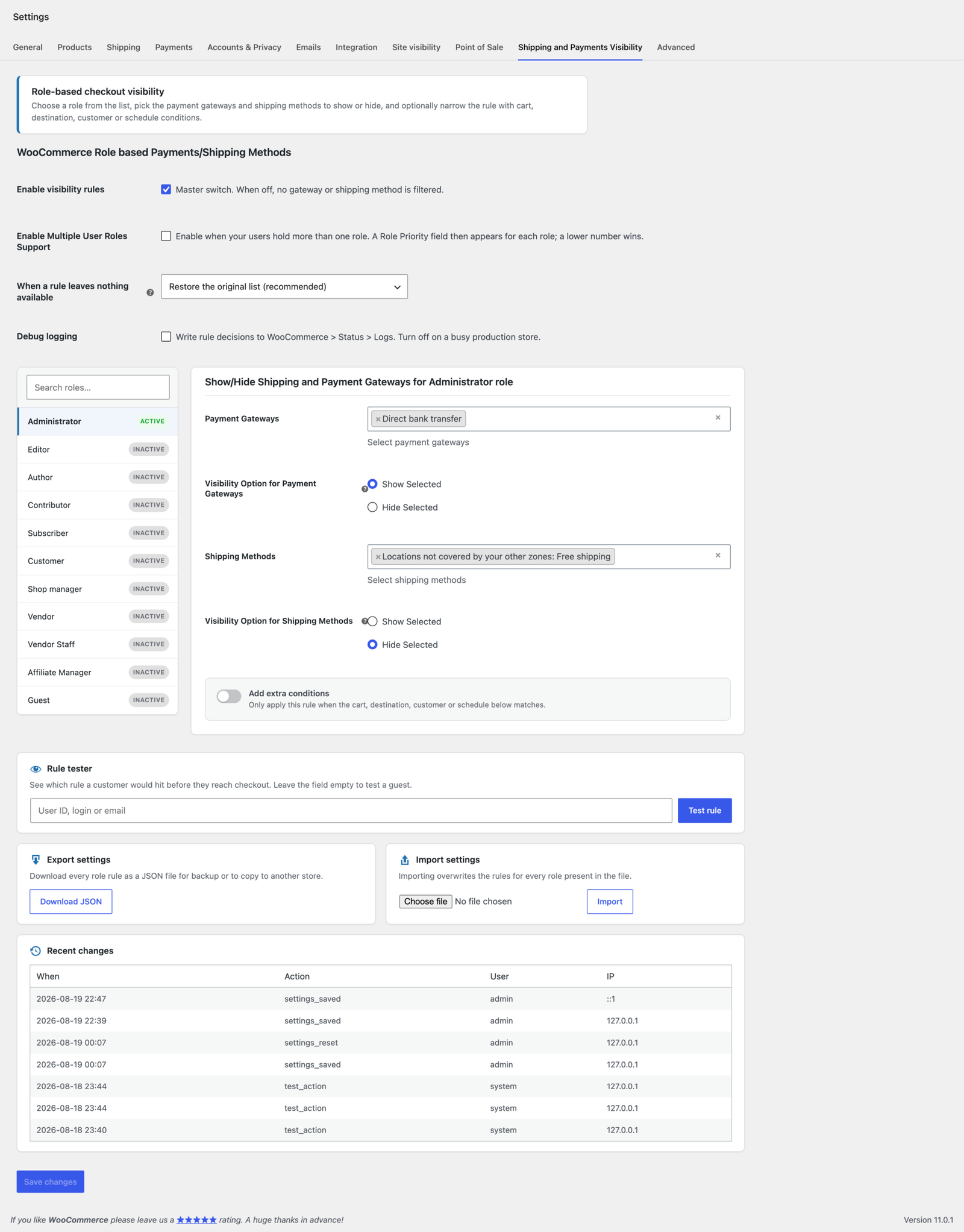
- Redesigned settings screen – a searchable role list on the left, the selected role’s rule on the right. No more scrolling through every role.
- Rule tester – enter a user ID, login or email and see exactly which rule that customer would hit, before they reach checkout.
- Import & export – move every rule between stores as a single JSON file.
- WP-CLI commands – test, import, export, reset and clear the cache from the command line.
- Safety fallback – if a rule would leave a customer with no way to pay or ship, the original list is restored so checkout never breaks.
- Audit log – see who changed the rules and when.
- Hardened throughout – capability and nonce checks on every save, full input validation, prepared SQL and a clean uninstall.
Features
- Show / hide Payment Gateways by user role
- Show / hide Shipping Methods by user role
- Zone aware shipping method rules
- Guest role support for logged-out shoppers
- Multiple user role support with role priority
- Show Selected (allow list) or Hide Selected (block list) per rule
- Searchable two-pane role navigator with Active / Inactive status
- Built-in rule tester
- Import / export all settings as JSON
- WP-CLI commands for automation
- Audit log of settings changes
- Optional debug logging to WooCommerce > Status > Logs
- HPOS (High-Performance Order Storage) compatible
- Cart & Checkout Blocks compatible
- Translation ready, with an up-to-date .pot template included
- Developer friendly, with filters for every decision point
Condition engine
Switch on Add extra conditions for any role and choose whether the rule applies when ALL conditions are met or when ANY single condition is met. Leave a field blank to ignore it.
- Cart totals – minimum / maximum subtotal, item count or total weight
- Cart contents – specific products, product categories, shipping classes or applied coupons
- Destination & customer – shipping country is / is not one of, or specific customers by user ID
- Schedule – active weekdays, a daily time window (wrapping past midnight is supported) and a date range, all in your store timezone
Typical uses
- Offer Cash on Delivery only to logged-in customers, never to guests
- Give wholesale buyers bank transfer while retail shoppers pay by card
- Unlock Local Pickup only for orders above a set value
- Restrict a courier to certain destination countries
- Run a free shipping method only at weekends, or only during a promotion window
- Hide a gateway when a specific product or shipping class is in the cart
Requirements
- WordPress 5.6 or newer (tested up to 7.0)
- WooCommerce 5.0 or newer (tested up to 11.0.1)
- PHP 7.4 or newer
Documentation
Full documentation ships inside the download from Envato / CodeCanyon. Open the documentation folder and load index.html in your browser for setup steps, a walkthrough of every condition, WP-CLI usage, the security model, developer hooks and a troubleshooting FAQ.
How updates are delivered
Automatic updates are delivered through the official Envato Market plugin, which links WordPress to your CodeCanyon account. If it is not yet installed or active, the plugin shows a single dismissible notice with a link to set it up. You can also update manually at any time by downloading the latest version from your Downloads page and uploading it. Your saved rules are never affected by an update.
The notice is guidance only: the plugin makes no outbound update checks and does not modify WordPress update transients or global HTTP requests, so it cannot interfere with other plugins.
Related products

Free Plugins
Christmas Snow for WordPress
$0.00
One-time

Plugins
Vendero - Multivendor for WooCommerce
Multivendor for WooCommerce is a powerful and complete marketplace plugin that transforms any WooCommerce store into…
From
$59.00
One-time
Plugins
Trackero - Advanced Shipment Tracking for WooCommerce
Complete fulfillment manager for WooCommerce: unlimited tracking numbers, 55+ carriers, custom order statuses (Shipped, Partially Shipped,…
From
$59.00
One-time