
Your cart is empty.
Browse plugins
Description
Kitero Composite Products lets you sell products where the customer has to make choices before buying. Instead of selling a fixed product, you define components, and the customer picks one option from each component to build their own version of the product.
A simple example: you sell a gift hamper. You want the customer to choose their own cheese, their own wine, and their own chocolate. Without this plugin, you would have to create hundreds of product variations to cover every combination. With this plugin, you create one product with three components – cheese, wine, and chocolate – and the customer picks one from each. The plugin handles everything: what they see, what they pay, and what goes into the order.
Another example: a computer builder. You create components for the processor, RAM, storage, and case. You add the relevant products to each component. The customer configures their machine, sees the total update live as they make selections, and adds it to the cart in one click.
The Problem It Solves
WooCommerce by itself handles variable products well, but variable products only work when the combinations are fixed and known in advance. As soon as you have more than two or three attributes, the number of variations explodes. Managing them becomes unworkable, and customers face a confusing wall of dropdowns.
This plugin takes a different approach. You define what the options are, not every possible combination. The customer assembles their own version, and the plugin tracks what they chose, prices it correctly, and sends the right information through to the order.
Who It Is For
This plugin suits any store that sells configurable or bundled products. That includes:
- Gift shops selling build-your-own hampers
- Food businesses selling meal kits or tasting boxes
- Electronics or PC stores selling custom builds
- Print shops offering personalised packs
- Subscription boxes where the customer picks the contents
It also suits stores that want to sell fixed bundles, a curated set of products sold together at one price, with no choices required from the customer. Bundle mode handles this.
What It Does in Practice
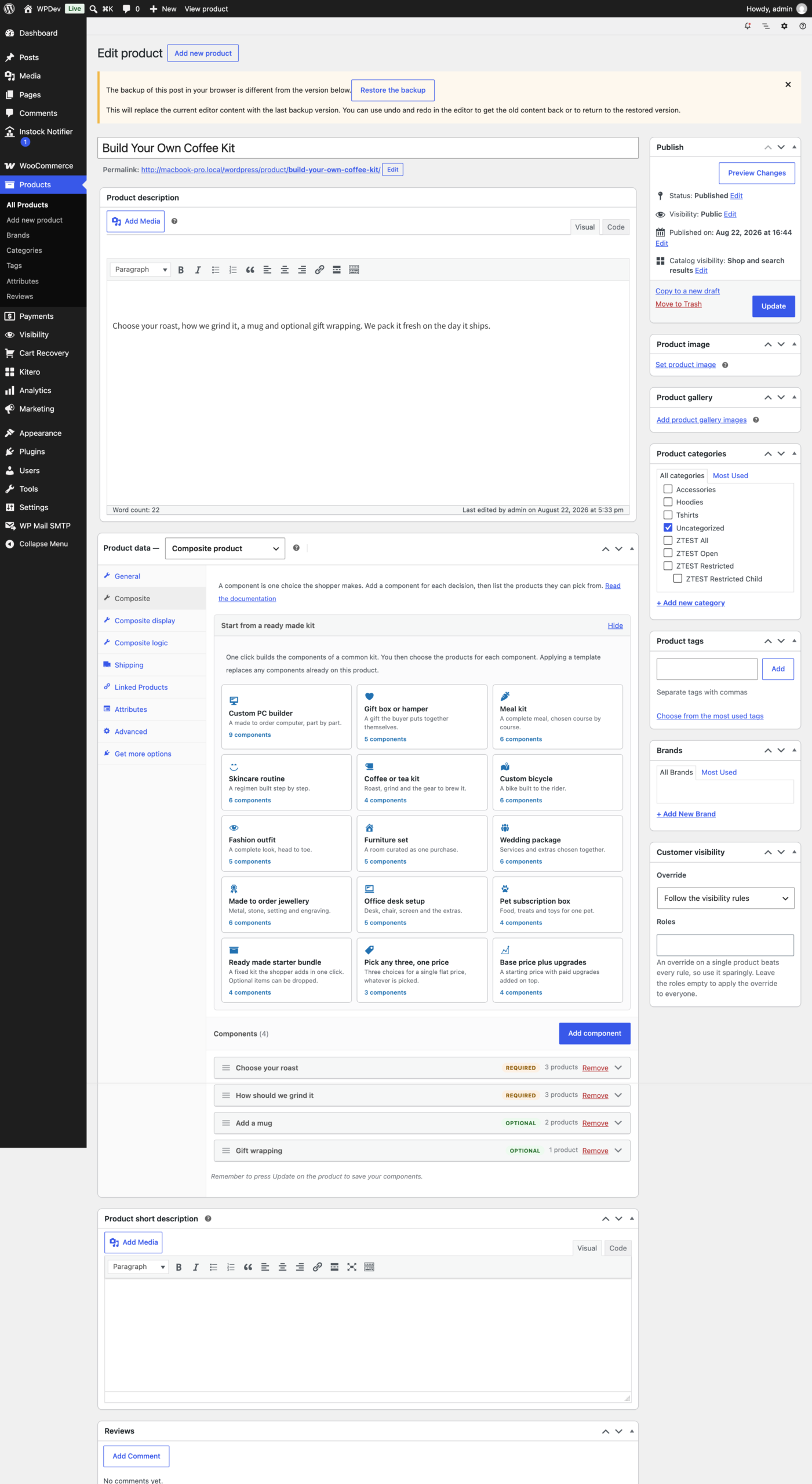
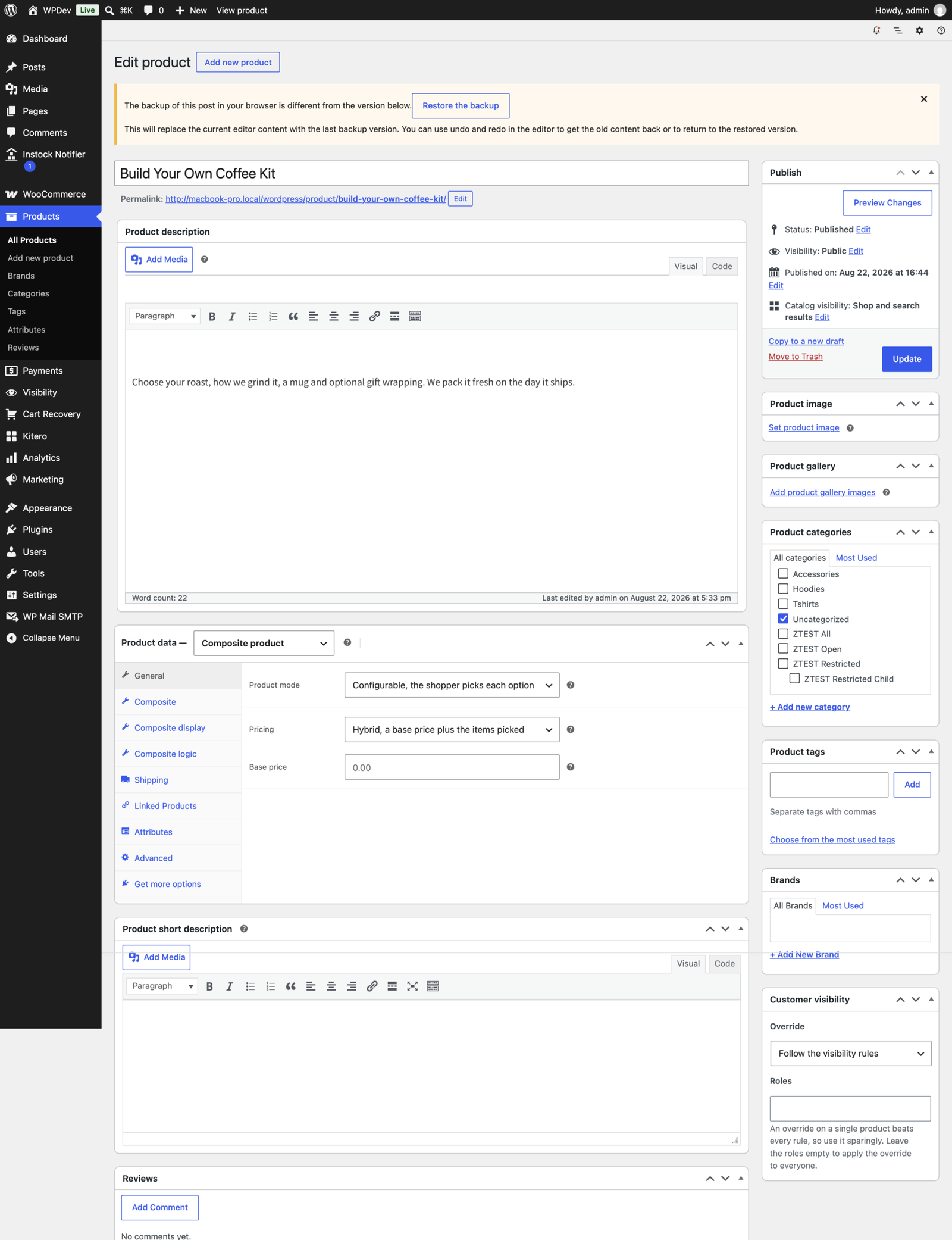
When you edit a product and set its type to Composite, three tabs appear in the product data box: Composite, Composite display, and Composite logic.
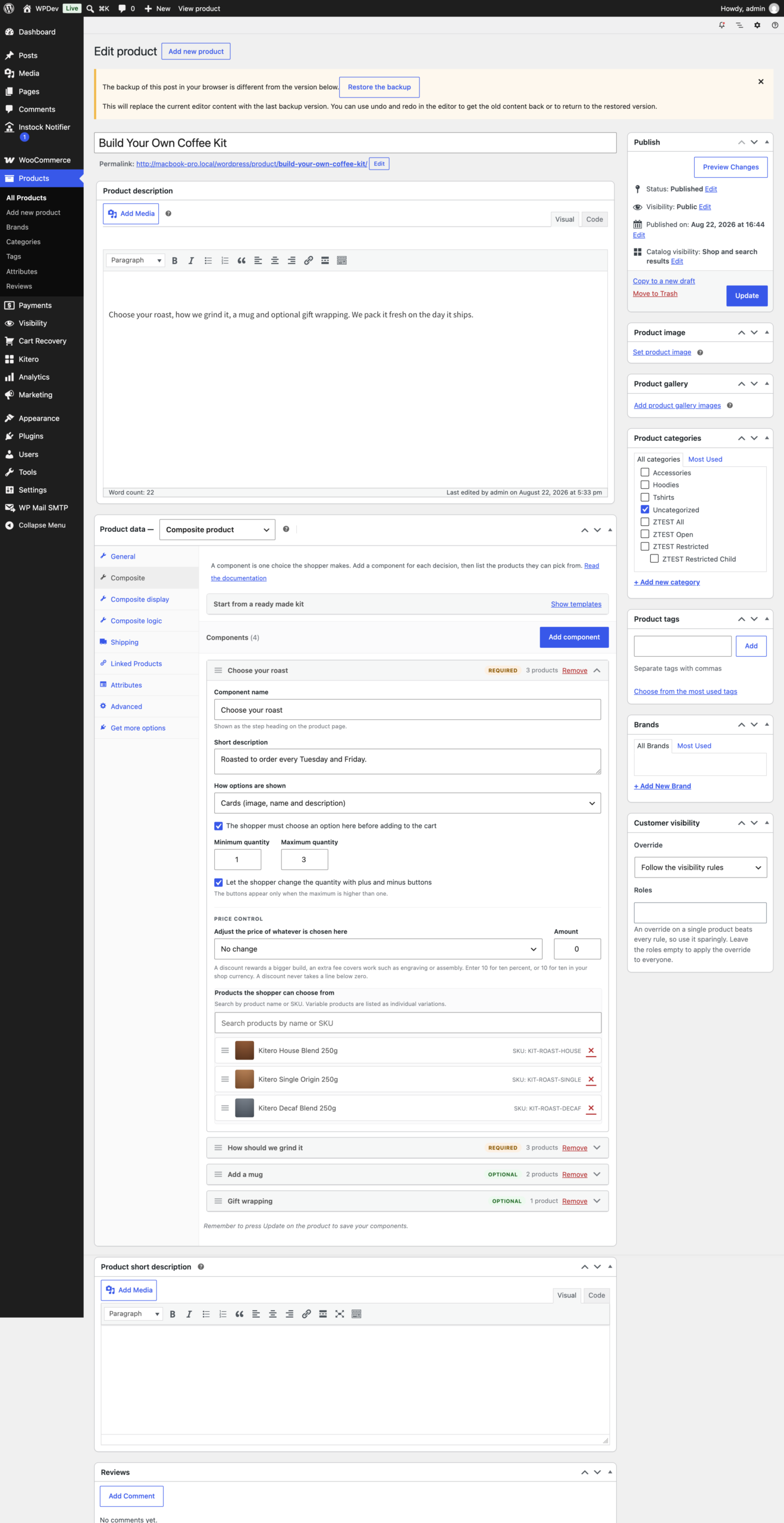
On the Composite tab you add components, give each one a name and description, set whether it is required or optional, and search for the products that belong to it. The search matches product names and SKUs, and it covers simple products, variable products and individual variations, with the SKU shown beside each result.
Each component has its own settings:
- Required or optional. A required component must be filled before the customer can add to cart. An optional one can be left empty, and the customer can clear a choice by clicking the selected option again.
- Minimum and maximum quantity, with optional plus and minus controls on the product page.
- Option display style, chosen per component. See below.
- Price control. Apply a percentage discount, a fixed discount, a percentage fee, or a fixed fee to every product in that component. A discount larger than the item price floors at zero rather than going negative.
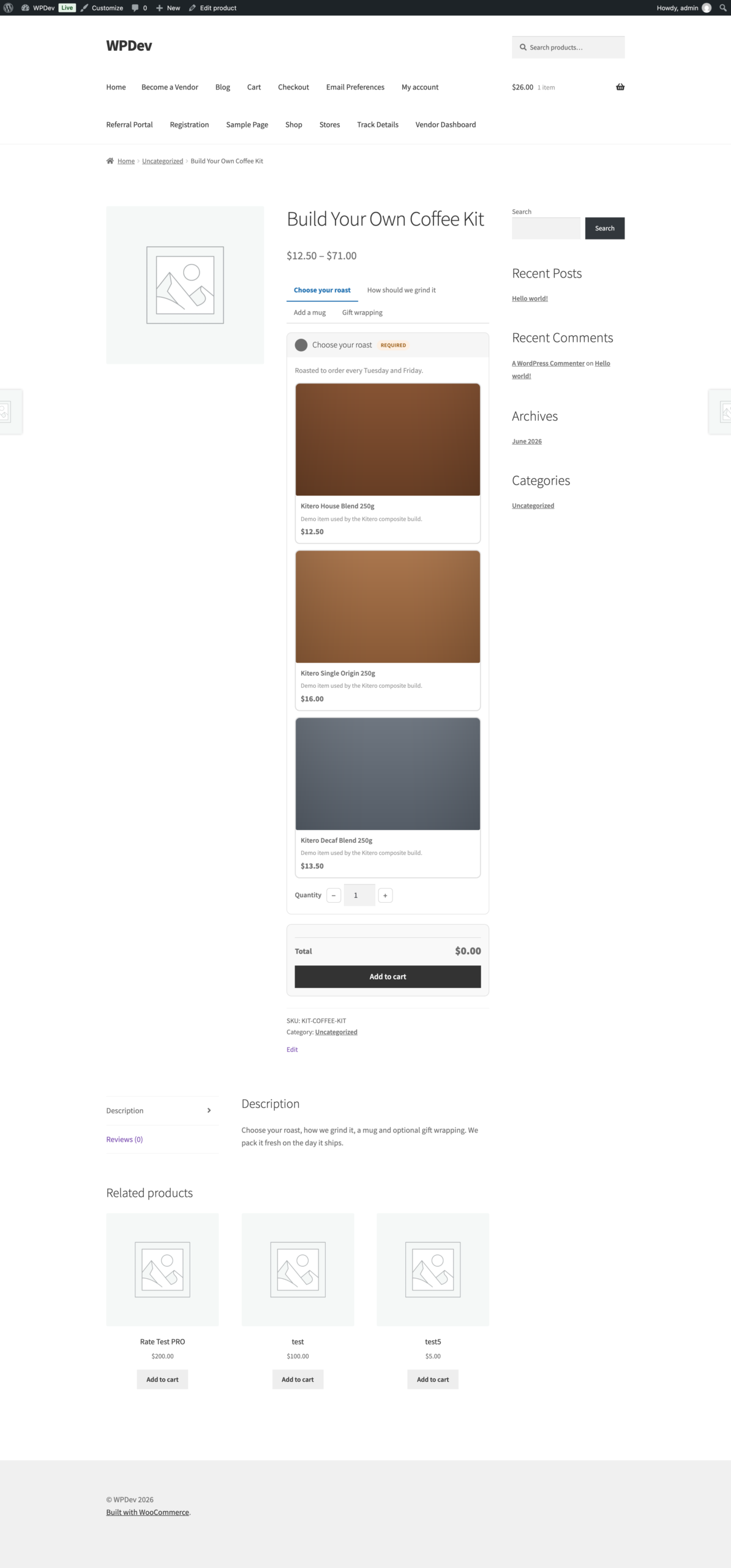
On the product page the customer sees each component with its options laid out in the style you picked. As they select options, the total updates live. When every required component is filled, they can add to cart in one request, so mini carts and side carts update without a full page reload.
In the order, each component selection is listed clearly. The customer sees what they chose in the cart, at checkout and in the order emails, and you see the same breakdown in the order details.
The General tab holds the pricing strategy:
- Per item. The total is the sum of what the customer picks.
- Fixed. One flat price no matter what is picked.
- Hybrid. A base price plus the items picked.
Bundle Mode
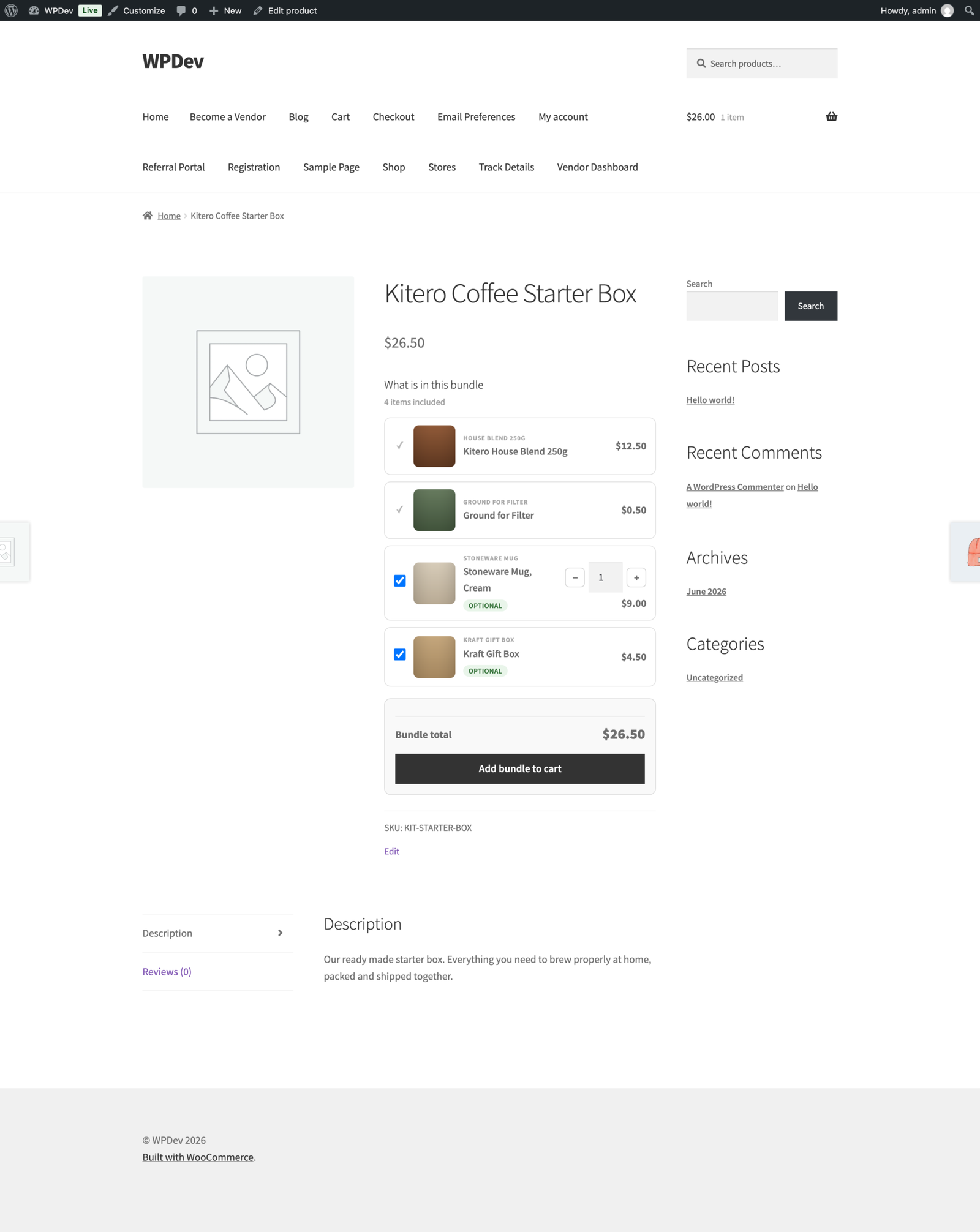
Bundle mode is a simpler version of the composite. You still use components and products, but the choices are made by you, not the customer. You pre-select the contents, and the product page shows a clean list of what is included.
The customer sees the items, sees any savings, and adds the whole bundle to cart in one click. There are no choices to make.
This is useful for curated gift sets, starter packs, or any situation where you want to sell a group of products together at a combined price.
Composite Logic
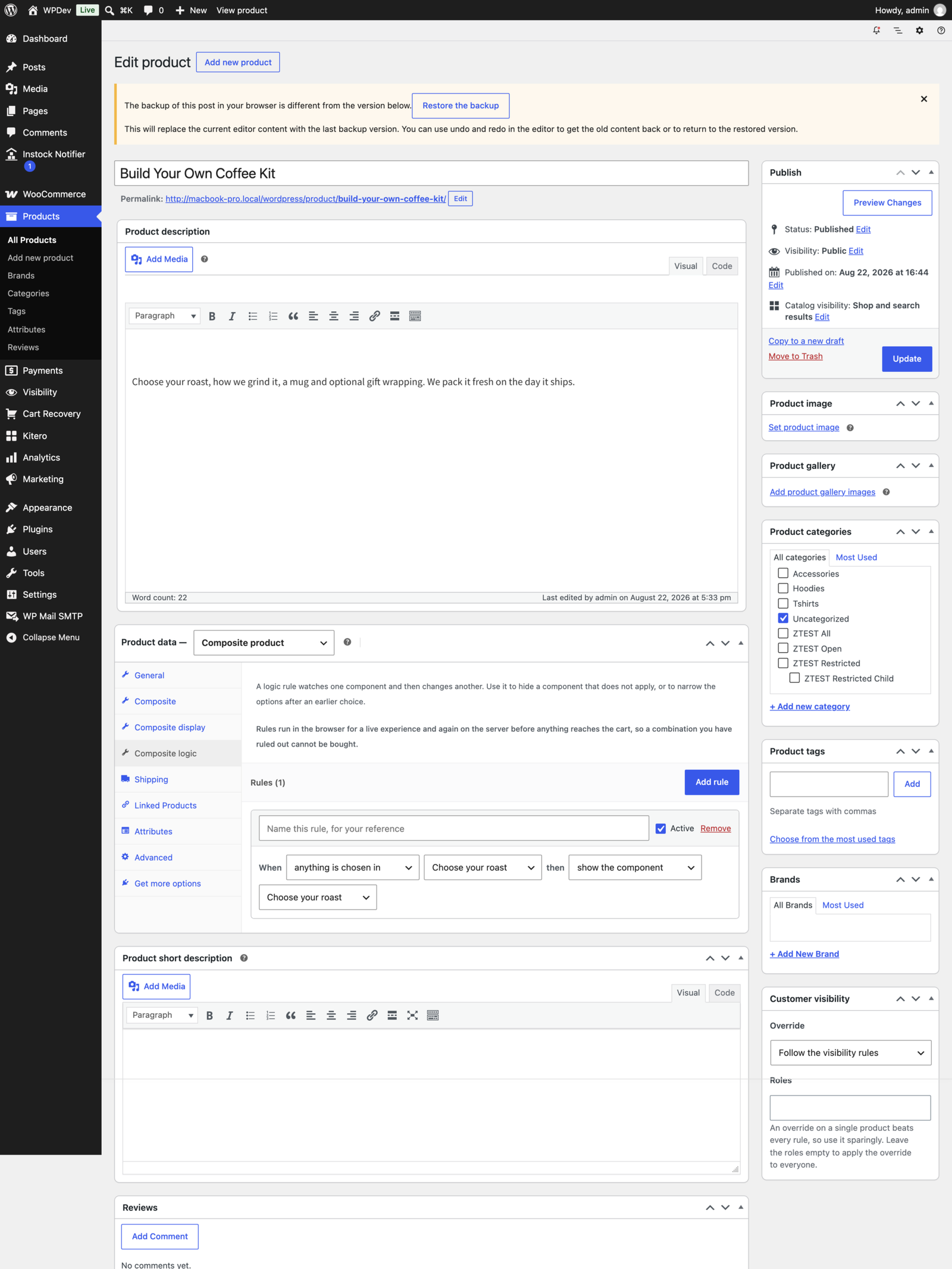
The Composite logic tab lets you create conditional rules between components, so the options presented adapt to what the customer has already chosen. Each rule reads like a sentence: when something happens in one component, then do something to another.
A rule can trigger on:
- anything is chosen in a component
- nothing is chosen in a component
- a specific option is chosen in a component
- a specific option is not chosen in a component
And it can act by:
- showing the component
- hiding the component
- allowing only the listed options
- removing the listed options
Rules run in the browser so the form responds immediately, and again on the server before anything reaches the cart. A combination you have ruled out cannot be bought by editing the page.
Because a rule points at a component by its ID, and a component is given an ID when the product is saved, add your components on the Composite tab and save once. The Composite logic tab then lists them and you can start linking them together.
Display and Layout
The Composite display tab sets the layout for that product. Four layouts are available:
- All components visible. Everything on one page, stacked.
- Accordion. One section open at a time, which keeps a long build readable on a phone.
- Step by step wizard. The customer moves through one component at a time.
- Tabbed. One tab per component.
Each component also has its own option display style, so different components on the same product can look different:
- Thumbnails. An image grid.
- Cards. Image, name and description.
- Radio buttons. A compact list.
- Dropdown. A select box.
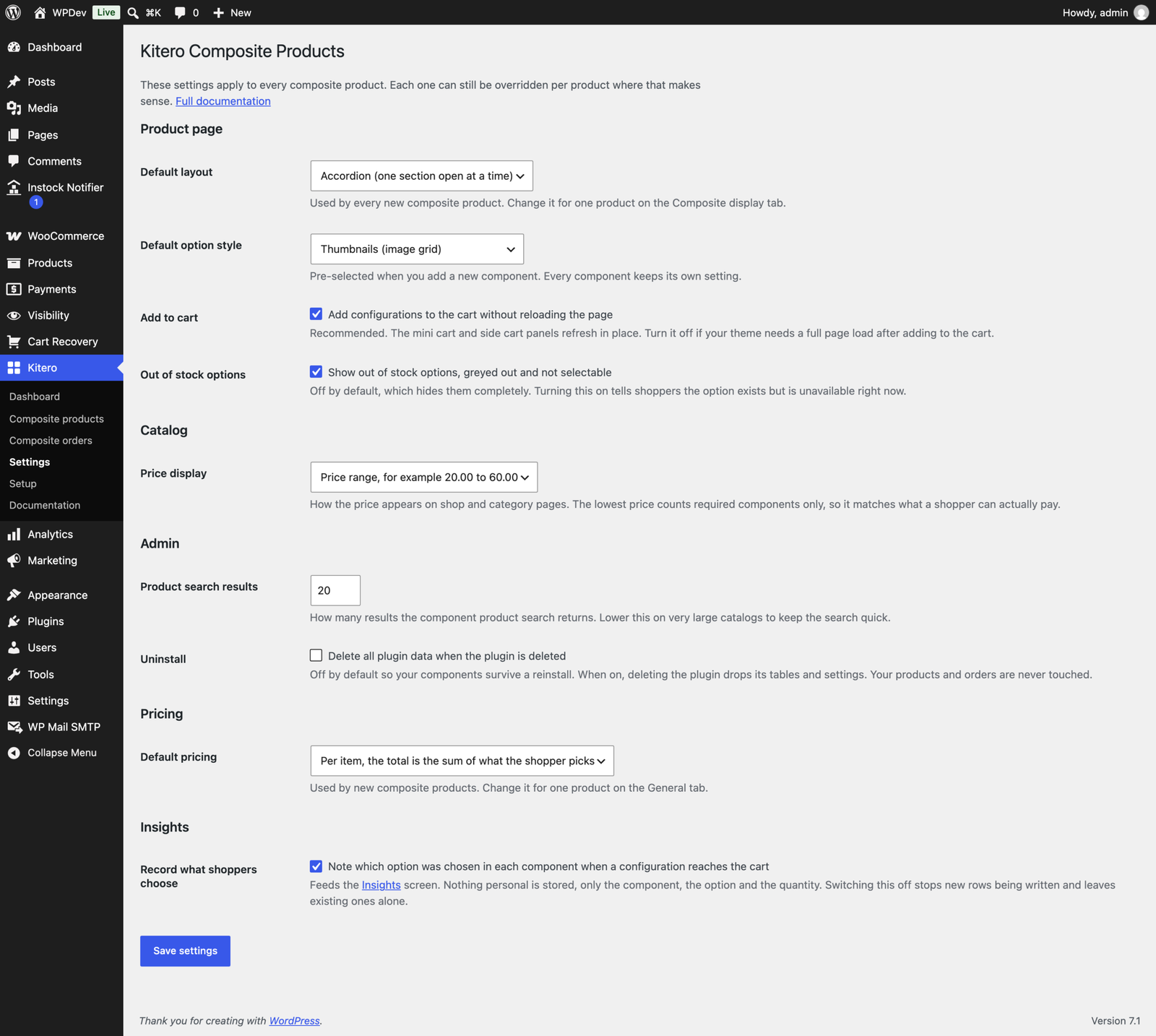
Store-wide defaults for the layout, the option style, whether out of stock options are shown, and how add to cart behaves live under Kitero, Settings.
Kit Templates
Fifteen ready-made kit templates set up a whole product in one click, so you can see a working composite before building your own. They cover a custom PC builder, gift hamper, meal kit, skincare routine, coffee or tea kit, custom bicycle, fashion outfit, furniture set, wedding package, made to order jewellery, office desk setup, pet subscription box, a ready made starter bundle, a pick any three one price kit, and a base price plus upgrades kit.
Applying a template creates the components and settings for you. You then swap in your own products.
Composite Insights
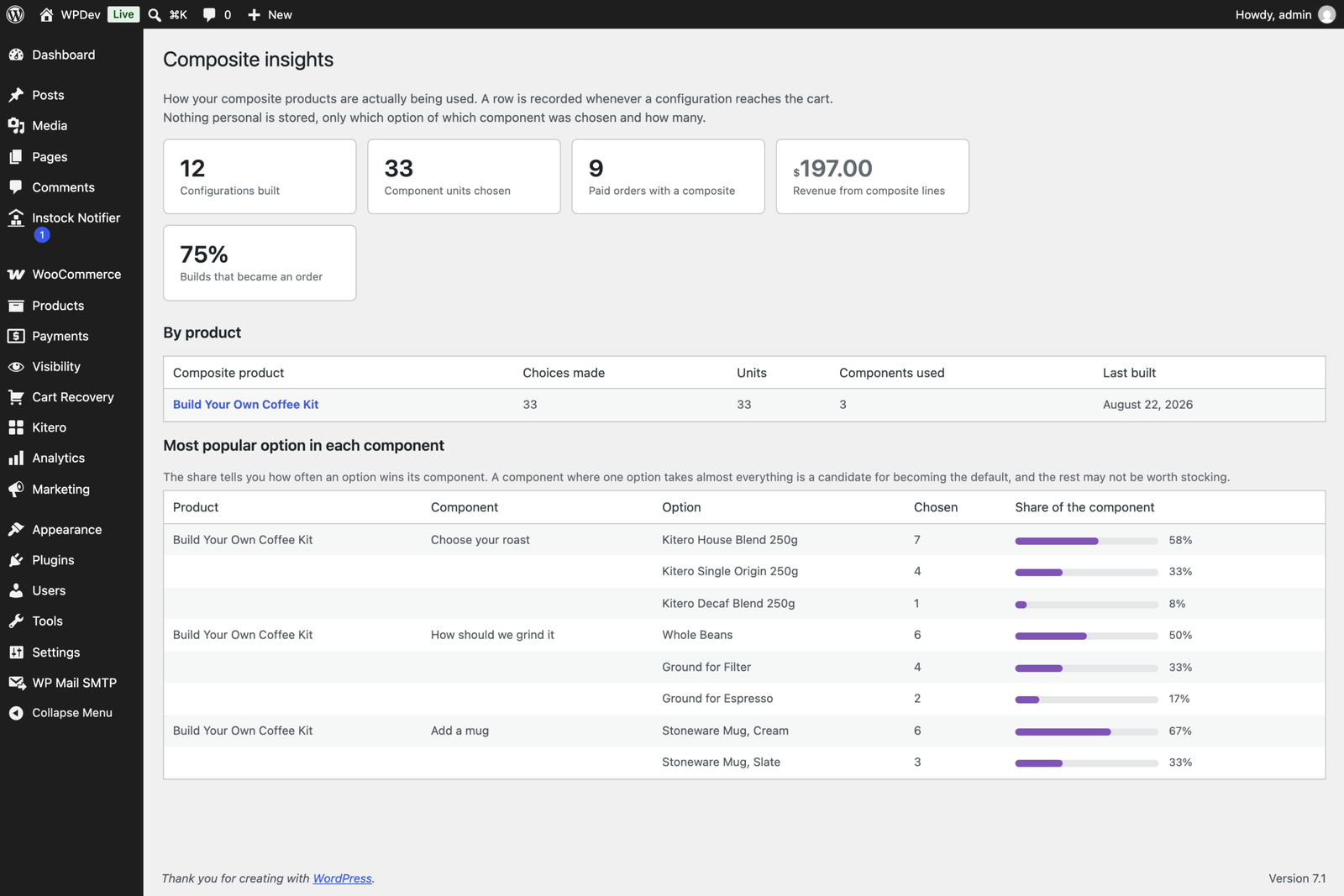
The Insights screen shows how your composites are actually performing: configurations built, units chosen, paid orders, revenue from composite lines, and what share of builds turned into an order. A per-product table breaks the same figures down, and each component shows a share bar for how often each option wins its component, so you can see which choices customers really make.
The Kitero Menu
Everything lives under one Kitero menu in the admin:
- Dashboard. An overview and quick links.
- Composite products. Every composite in one list, with components, options, layout, catalog price and status, searchable and sortable.
- Composite orders. Orders that contain a composite line, working with both the new high performance order storage and the legacy tables.
- Insights. The report described above.
- Settings. Store-wide defaults.
- Setup. A guided wizard for a first run.
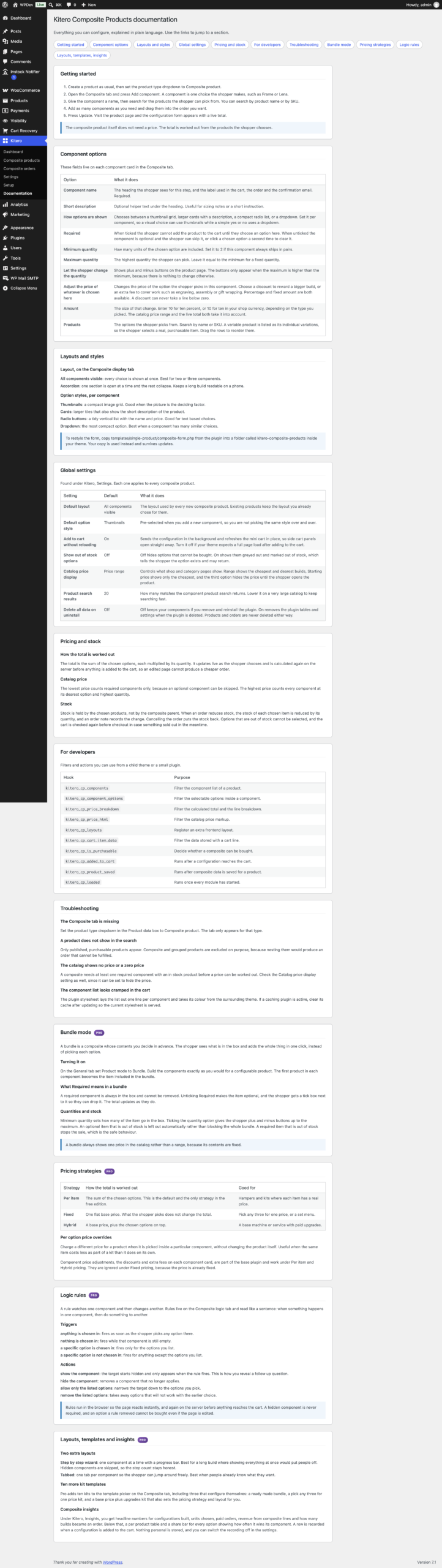
- Documentation. Built in documentation explaining every option, so you never have to leave the admin to look something up.
Free and Pro
The free edition on WordPress.org includes the composite product type, unlimited components and options, all four option display styles, the All components visible and Accordion layouts, per item pricing, component price control, SKU search, five kit templates, the product and order list screens, the setup wizard and the built in documentation.
Pro adds bundle mode, fixed and hybrid pricing, composite logic rules, the step by step wizard and tabbed layouts, ten further kit templates, and Composite insights.
Installing Pro switches the free edition off for you and carries your existing products, components and settings straight over. Nothing needs to be rebuilt.
Changelog
1.0.0
- Initial release.
Additional information
| License | Starter License, Growth License, Ultimate License |
|---|
Related products

Plugins
Vendero - Multivendor for WooCommerce
Multivendor for WooCommerce is a powerful and complete marketplace plugin that transforms any WooCommerce store into…
From
$59.00
One-time

Plugins
Inputo - Name Your Price for WooCommerce
Let customers choose what they want to pay.Name Your Price for WooCommerce enables pay-what-you-want pricing with…
From
$39.00
One-time
Plugins
Trackero - Advanced Shipment Tracking for WooCommerce
Complete fulfillment manager for WooCommerce: unlimited tracking numbers, 55+ carriers, custom order statuses (Shipped, Partially Shipped,…
From
$59.00
One-time