
Your cart is empty.
Browse plugins
Description
Sync waitlist subscribers into a Brevo list with product attributes, and optionally fire a Brevo transactional template as the restock notification instead of the WooCommerce email.
Two things happen here. Waitlist subscribers become Brevo contacts on the list you choose, with the product they want stored as contact attributes. Optionally, Brevo also sends the restock alert itself from one of your transactional templates, so the design lives in Brevo rather than in WooCommerce.
How it works
- Contacts are upserted onto your chosen list with the product stored as contact attributes. If Brevo reports the contact already exists, the add-on falls back to an explicit update rather than failing the row.
- Optionally Brevo also sends the restock alert itself. With a transactional template ID set and events enabled, the alert is sent from Brevo with the product passed as template parameters, and the WooCommerce notification is suppressed so the customer receives one email rather than two.
Setting it up
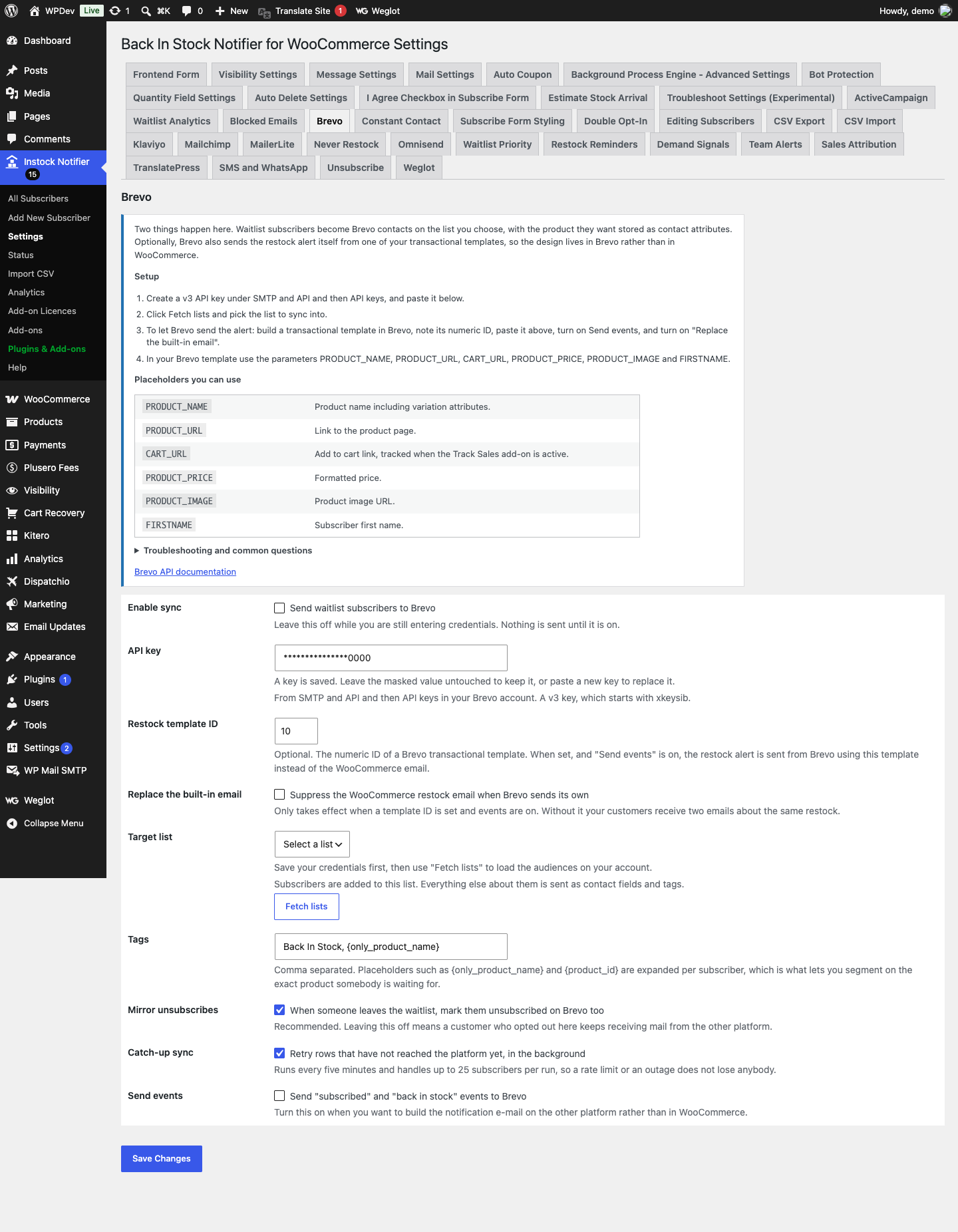
- Create a v3 API key under SMTP and API and then API keys, and paste it into the add-on settings.
- Click Fetch lists and pick the list to sync into.
- To let Brevo send the alert: build a transactional template in Brevo, note its numeric ID, paste it above, turn on Send events, and turn on “Replace the built-in email”.
- In your Brevo template use the parameters PRODUCT_NAME, PRODUCT_URL, CART_URL, PRODUCT_PRICE, PRODUCT_IMAGE and FIRSTNAME.
Shortcodes
PRODUCT_NAMEProduct name including variation attributes.PRODUCT_URLLink to the product page.CART_URLAdd to cart link, tracked when the Track Sales add-on is active.PRODUCT_PRICEFormatted price.PRODUCT_IMAGEProduct image URL.FIRSTNAMESubscriber first name.
Common questions
Customers are getting two emails. Turn on “Replace the built-in email”. Without it, WooCommerce sends its notification and Brevo sends yours.
The Brevo email arrives with empty placeholders. The parameter names in your template must match exactly, in capitals, and be referenced as {{ params.PRODUCT_NAME }} in Brevo’s syntax.
I get a “duplicate_parameter” error. Brevo returns that when the contact already exists with a conflicting attribute type, usually a text attribute that was previously created as a number. Fix the attribute type in Brevo under Contacts and then Settings.
Should I use this or the built-in email? If your marketing team already works in Brevo, hand it over. If your restock email is a plain text message that rarely changes, the built-in one is simpler and has one fewer thing to break.
Data and privacy
- Sent to Brevo: email address, first and last name, phone number in the SMS attribute if given, and attributes holding the product name, ID, SKU and tags.
- If Brevo is sending the alert, the template parameters also carry the product URL, add to cart link, price and image URL.
- Stored in WordPress: a per subscriber synced flag and the cached list of lists.
- Leaving a waitlist removes the contact from the selected list only. The address is never blacklisted, because that would also stop your order emails reaching them.
Additional information
| License | Starter License, Growth License, Ultimate License |
|---|
Related products
Back In stock Notifier for WooCommerce: Add-ons
Ban Emails - Back In Stock Notifier for WooCommerce
From
$19.00
One-time
Back In stock Notifier for WooCommerce: Add-ons
MailerLite Add-on - Back In Stock Notifier for WooCommerce
From
$19.00
One-time
Back In stock Notifier for WooCommerce: Add-ons
Polylang Add-on - Back In Stock Notifier for WooCommerce
From
$19.00
One-time