Your cart is empty.
Browse plugins
How it works
- The language somebody was viewing is recorded on their row when they subscribe. Before each message is built the site is switched into that language, and afterwards it is always restored to the language captured before the first switch, never to the previous recipient. On a batched restock that distinction is what stops every later email inheriting the wrong language.
- TranslatePress has no string registry, because it works by translating rendered page output and an email is never rendered as a page. That is why the email text is written per language here rather than in the TranslatePress editor. Where your version of TranslatePress provides a string translation helper it is used for anything left blank.
- TranslatePress does not duplicate posts, so a product has one waitlist no matter how many languages you sell in. The shared waitlist setting that the WPML and Polylang add-ons need does not apply here and is not offered.
- Since version 7 the parent plugin sends through WooCommerce email classes, so the translated text is applied through the WooCommerce subject, heading and additional content filters rather than the older raw filters, whose result is discarded on that path.
- WooCommerce resets the locale to the site default partway through sending a customer email. That is suppressed while a send is in progress, otherwise the template reverts to the site language while your own text stays translated, which is how you end up with a half translated email.
Setting it up
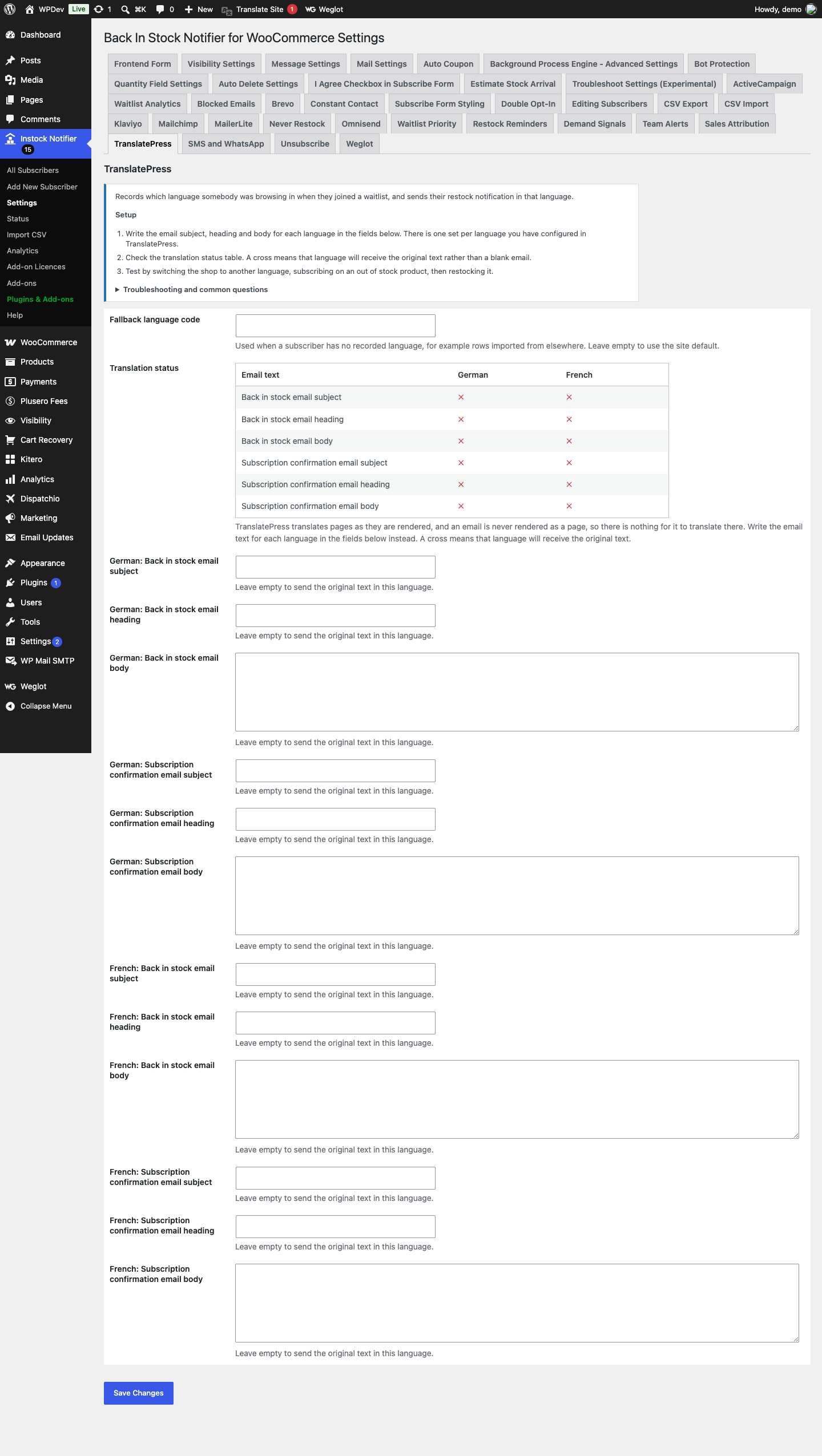
- Write the email subject, heading and body for each language in the fields in the add-on settings. There is one set per language you have configured in TranslatePress.
- Check the translation status table. A cross means that language will receive the original text rather than a blank email.
- Test by switching the shop to another language, subscribing on an out of stock product, then restocking it.
Common questions
Why can I not translate these in the TranslatePress editor? The TranslatePress editor works on rendered pages. An email is built and sent without ever being rendered as a page, so it never passes through that editor. Writing the text here is the only reliable way to control what each language receives.
Do I need the shared waitlist setting? No. TranslatePress translates a single post rather than duplicating it, so each product already has exactly one waitlist. That setting exists for WPML and Polylang, which do duplicate posts.
What happens if I leave a language blank? Those subscribers receive the original text. Nothing is ever sent blank.
Data and privacy
- One extra value is stored per subscriber: the language code they were browsing in. Nothing is sent to any third party.