
Your cart is empty.
Browse plugins
Description
Sync waitlist subscribers into a Constant Contact list over OAuth, with tokens refreshed automatically and the product they are waiting for recorded against the contact.
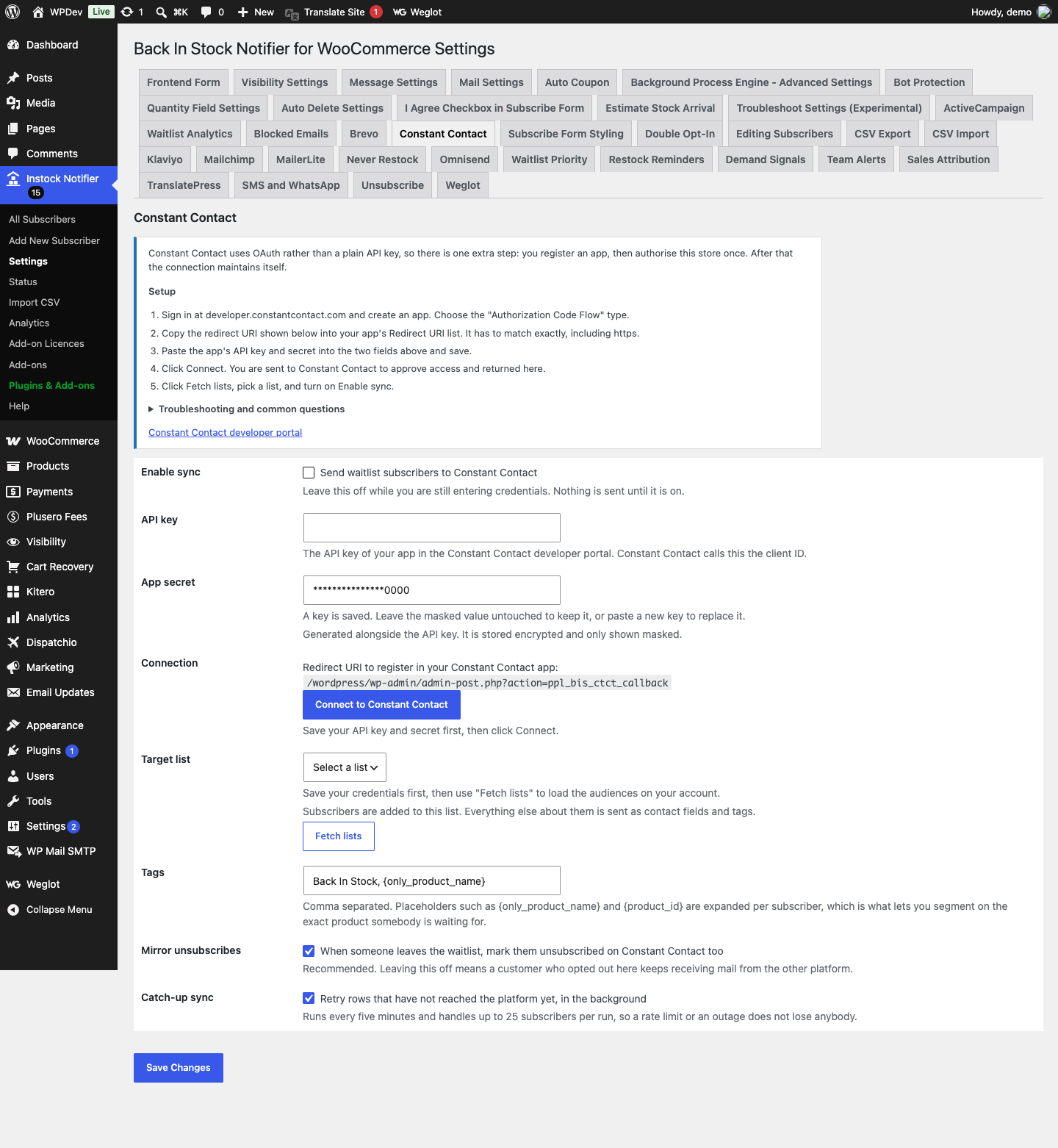
Constant Contact uses OAuth rather than a plain API key, so there is one extra step: you register an app, then authorise this store once. After that the connection maintains itself.
How it works
- Constant Contact does not accept a static API key. It requires OAuth: you authorise this store once, and the add-on receives an access token valid for eight hours plus a refresh token used to obtain the next one.
- Refresh tokens are single use. Constant Contact issues a new one every time you refresh, so the stored token is always replaced. Keeping the old one would break the connection a few hours later, which is the usual cause of an integration that works on the day it is set up and not the next morning.
- Contacts are created through the sign-up form endpoint, which records implied consent, the correct basis for somebody who asked to be told about a restock. The product they are waiting for is attached as a note, since Constant Contact has no tag concept.
Setting it up
- Sign in at developer.constantcontact.com and create an app. Choose the “Authorization Code Flow” type.
- Copy the redirect URI shown below into your app’s Redirect URI list. It has to match exactly, including https.
- Paste the app’s API key and secret into the two fields above and save.
- Click Connect. You are sent to Constant Contact to approve access and returned here.
- Click Fetch lists, pick a list, and turn on Enable sync.
Common questions
I get “redirect_uri did not match”. The URI registered in your app must be character for character identical to the one shown below, including the protocol and any www. Sites that changed domain, or that run admin over plain http, hit this most often.
The connection stopped working after a while. Access tokens expire after eight hours and are refreshed automatically. If the refresh token was revoked at the Constant Contact end, or the app secret was regenerated, reconnect with the button below.
Why does it ask for offline access? That is the scope that grants a refresh token. Without it you would have to reauthorise by hand every eight hours.
What is stored on the contact? Name, email, and a note recording the product they are waiting for. Constant Contact has no tag concept, so list membership plus the note is how you segment.
Data and privacy
- Sent to Constant Contact: email address, first and last name, phone number if given, list membership, and a note naming the product and SKU somebody is waiting for.
- Stored in WordPress: the OAuth access and refresh tokens, both encrypted at rest, their expiry time, a per subscriber synced flag, and the cached list of lists.
- Leaving a waitlist removes the contact from the selected list. The contact record itself is kept.
Additional information
| License | Starter License, Growth License, Ultimate License |
|---|
Related products

Back In stock Notifier for WooCommerce: Add-ons
Export CSV Add-on - Back In Stock Notifier for WooCommerce
From
$19.00
One-time
Back In stock Notifier for WooCommerce: Add-ons
Track Sales - Back In Stock Notifier for WooCommerce
Track Sales is an add-on for Back In Stock Notifier. Using this Add-on you can track…
From
$19.00
One-time
Back In stock Notifier for WooCommerce: Add-ons
Priority Add-on - Back In Stock Notifier for WooCommerce
From
$19.00
One-time